The digital QRQC platform for manufacturing: React in minutes. Solve for good.
QRQC takes every quality incident from the shop floor to closure: 5W2H in seconds, containment within 24 hours, 5-Why and Ishikawa analysis, tracked action plans, lessons learned and a ready-to-send 8D — with live KPIs for every line, workshop and plant.
- 22 languages
- Single sign-on
- Hosted in France
Built around the methods your teams already use
- 5W2H
- 5 Why
- Ishikawa 5M
- Fault tree analysis
- 24h containment
- Sorting & reaction rules
- PDCA
- 8D report
- Lessons learned (LLC)
- SQCDP
- Genba
- Quality alerts
- guided steps from detection to the 8D report
- 7
- QRQC modules, from line to plant, suppliers and HSE
- 8
- interface languages, including Arabic
- 22
- deadlines followed on every incident
- 24h · 10d · 30d
The problem
QRQC on Excel, email and WhatsApp doesn't scale.
The method works. The tooling around it doesn't: information is scattered, deadlines slip silently and the same defects come back.
Nobody sees the full picture
Each line, workshop and plant keeps its own file. Managers wait for Monday's consolidation to know where they stand.
Deadlines slip silently
Containment, analysis and actions are chased by email. Nobody notices a missed 24-hour containment until the customer does.
Lessons get lost
Root causes and fixes stay in one team's folder. The same defect reappears on another line six months later.
Today
- One Excel file per line, per week, per plant
- Containment coordinated in chat groups
- Supplier claims buried in email threads
- 8D reports rebuilt by hand for every customer
- KPIs consolidated manually every week
- Lessons learned forgotten after closure
With QRQC
- One live record per incident, from 5W2H to closure
- 24h, 10-day and 30-day deadlines on the daily agenda
- Suppliers answer directly in their secure portal
- 8D and lessons-learned PDFs generated in one click
- KPIs and SQCDP updated live for every plant
- Lessons learned shared and reused across lines
Product tour
One guided flow, from first defect to 8D
Every incident follows the same structured path — so no step is skipped, whoever handles it and whichever plant it happens in.
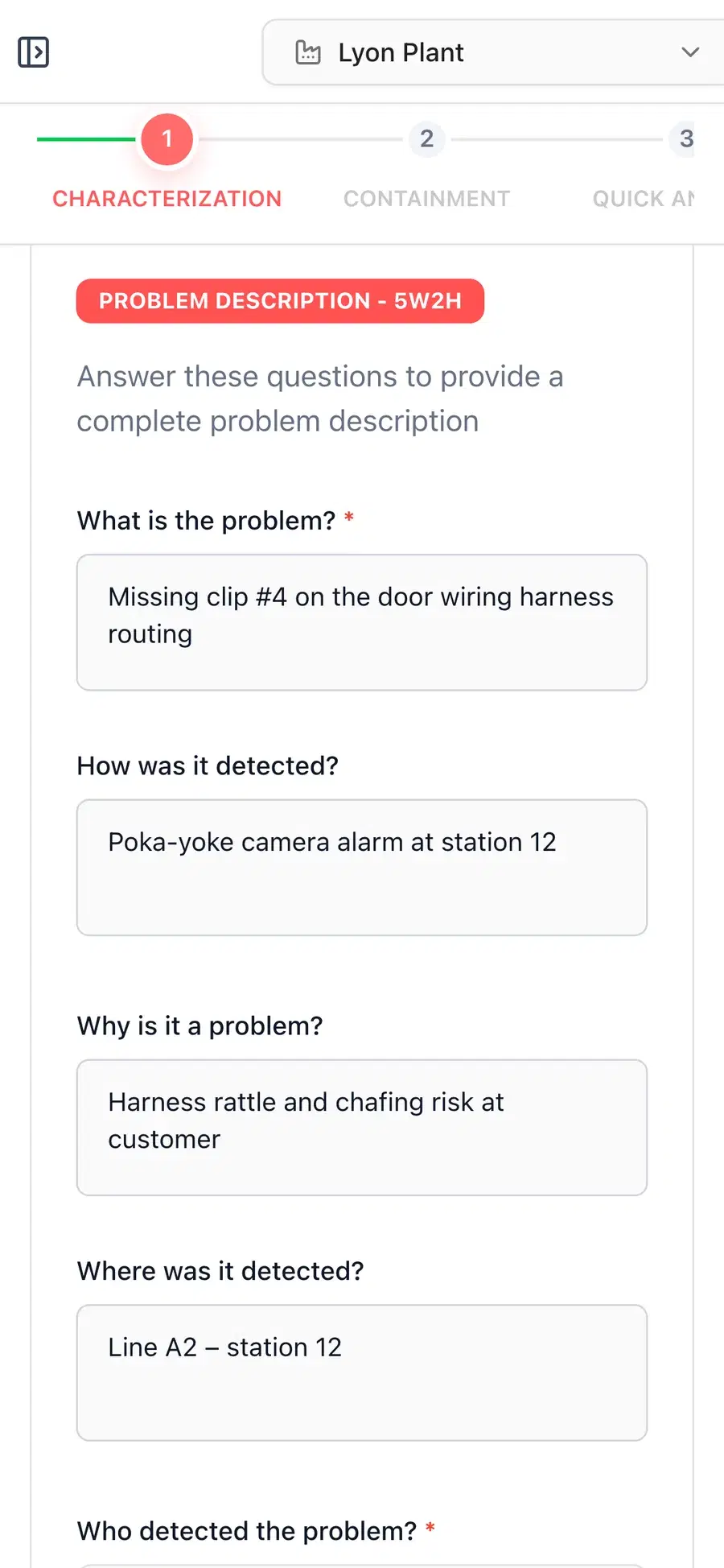
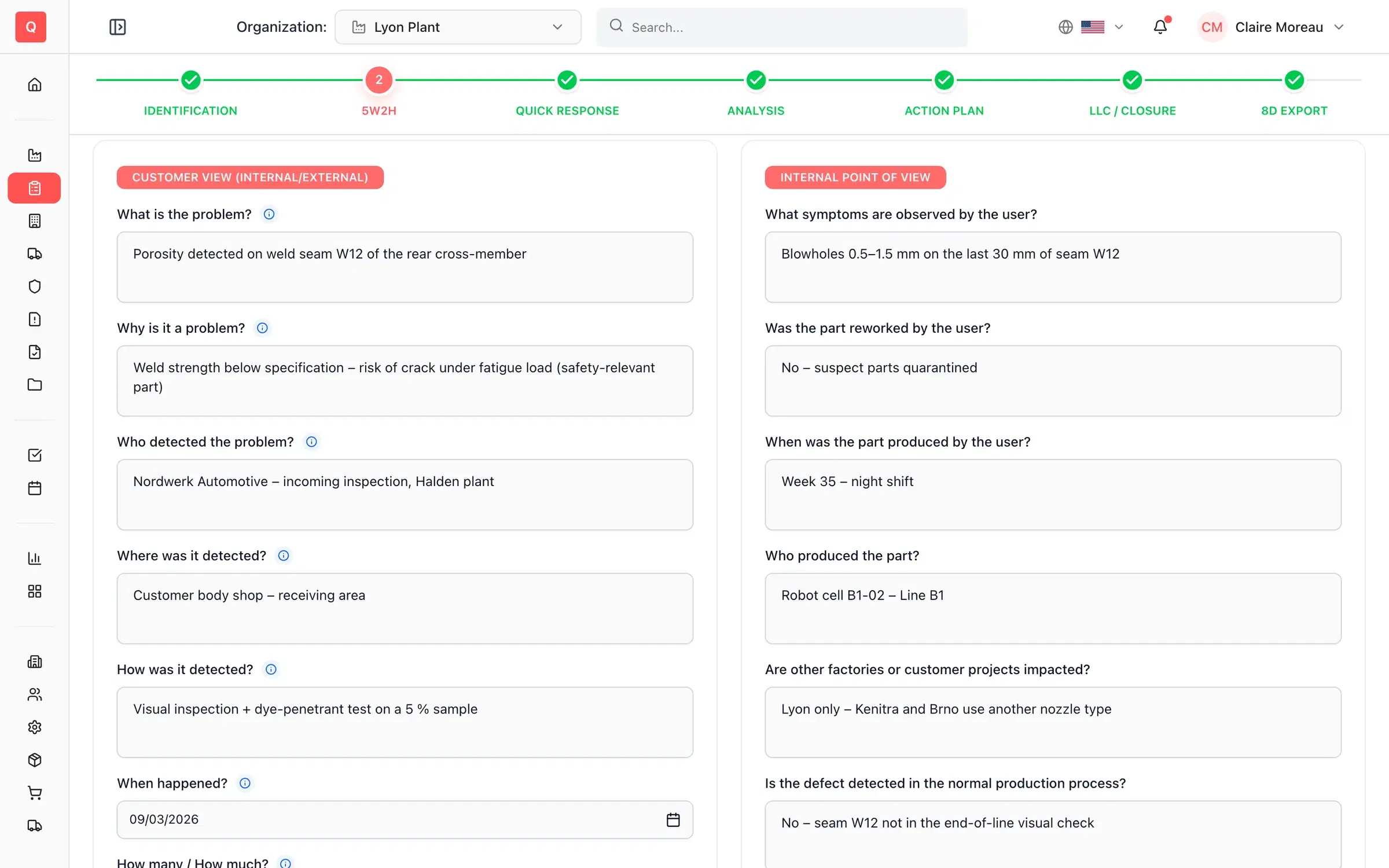
01 · In seconds
Capture the problem with 5W2H
Operators and quality engineers record the incident from a phone, tablet or PC: what, where, when, who, how, how many — with photos of good and bad parts, the part number and the defect code.
- Guided 5W2H with part numbers, customers and defect codes
- Yellow and red quality alerts by email, exportable to PDF or Excel
- Escalate from line to workshop or plant in one click
02 · Within 24h
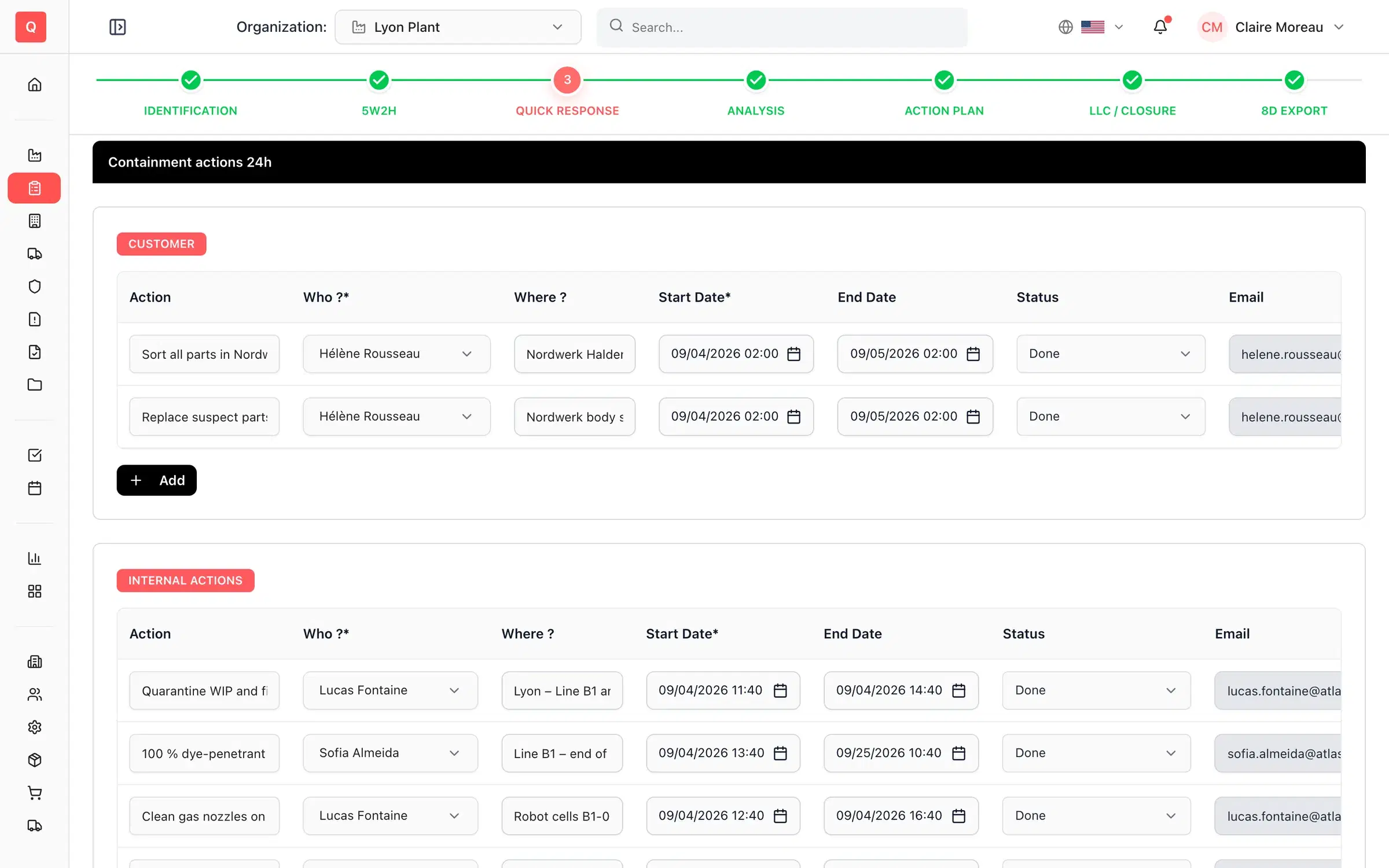
Protect the customer within 24 hours
Launch containment actions on the customer, internal and supplier sides, organize sorting and apply the reaction rules defined for each defect code.
- Customer, internal and supplier containment with owners and dates
- Sorting areas and reaction rules per defect code
- Validation by the quality manager and plant manager
03 · Within 10 days
Find the real root cause
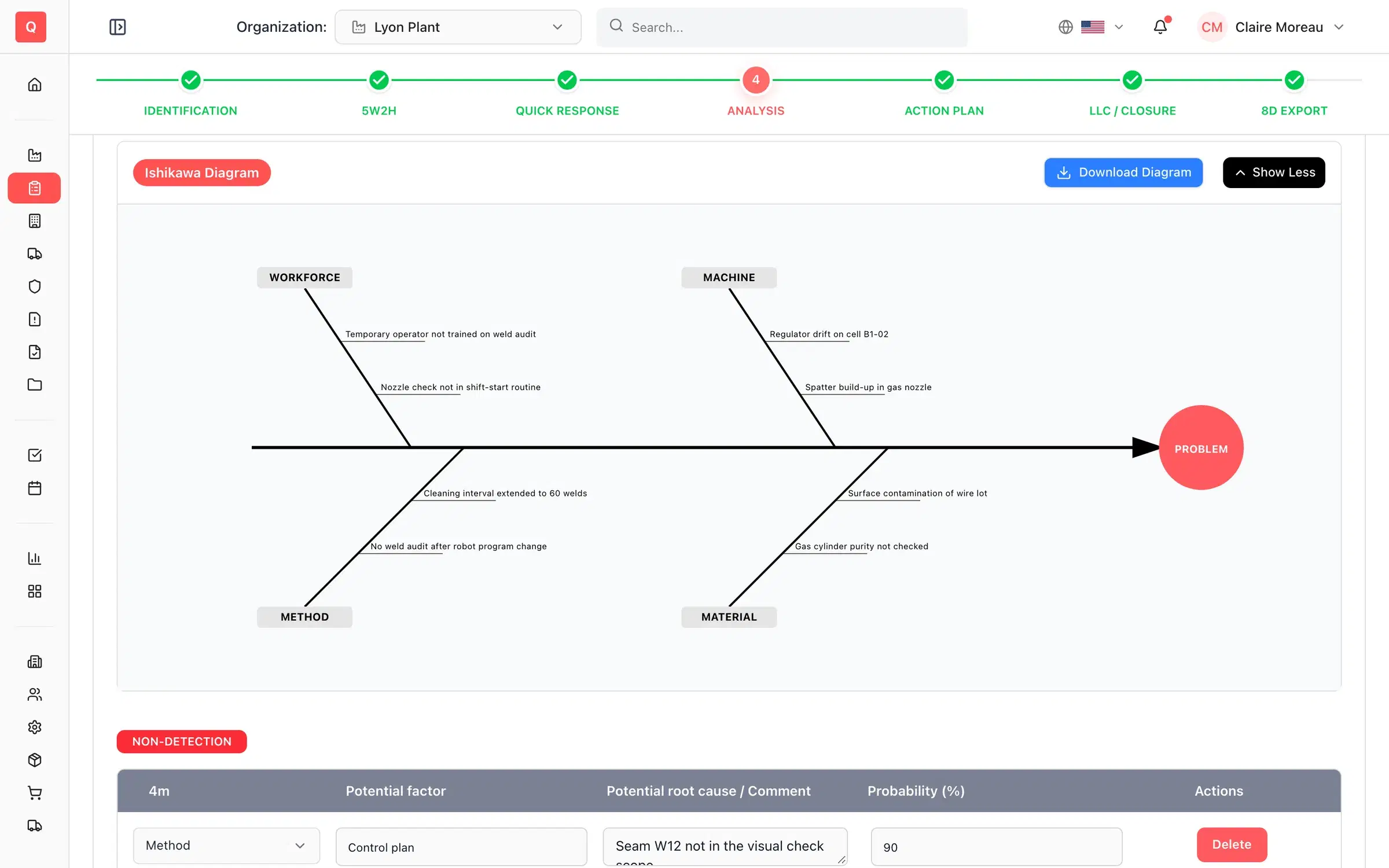
Assign the analysis, reproduce the defect and work through 5-Why for occurrence and non-detection, an Ishikawa (5M) diagram or a fault tree — all inside the incident record.
- 5-Why for occurrence and non-detection
- Ishikawa diagram and fault tree, exportable to PDF
- Analysis assignments with a shared timeline
04 · Within 30 days
Act, check and standardize
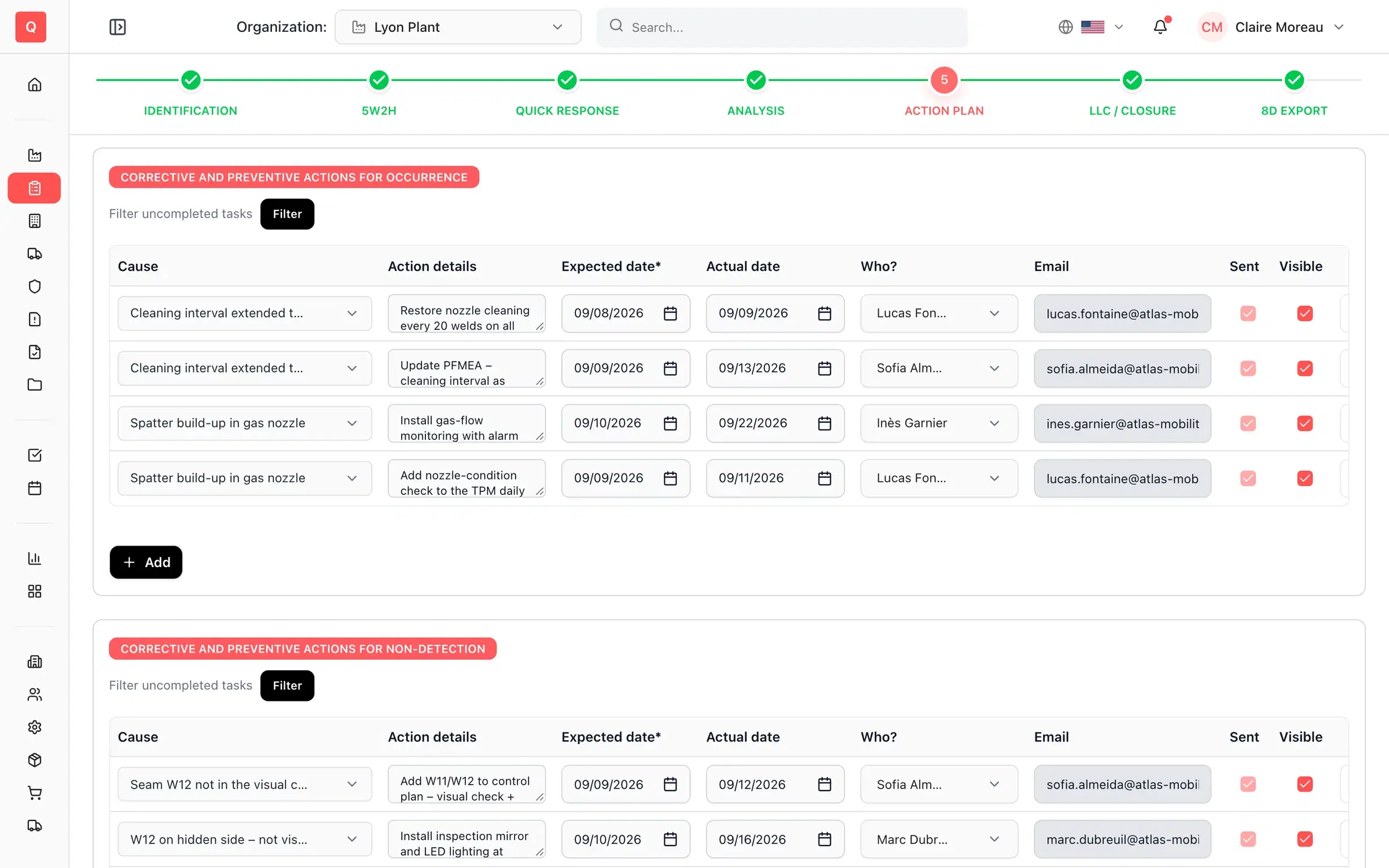
Build corrective and preventive action plans, measure their efficiency, run the closure checklist and roll the fix out to other lines and products.
- Corrective and preventive actions with owners and deadlines
- Action-plan efficiency check and closure checklist
- Standardization to other lines and products
05 · At closure
Capitalize and send the 8D
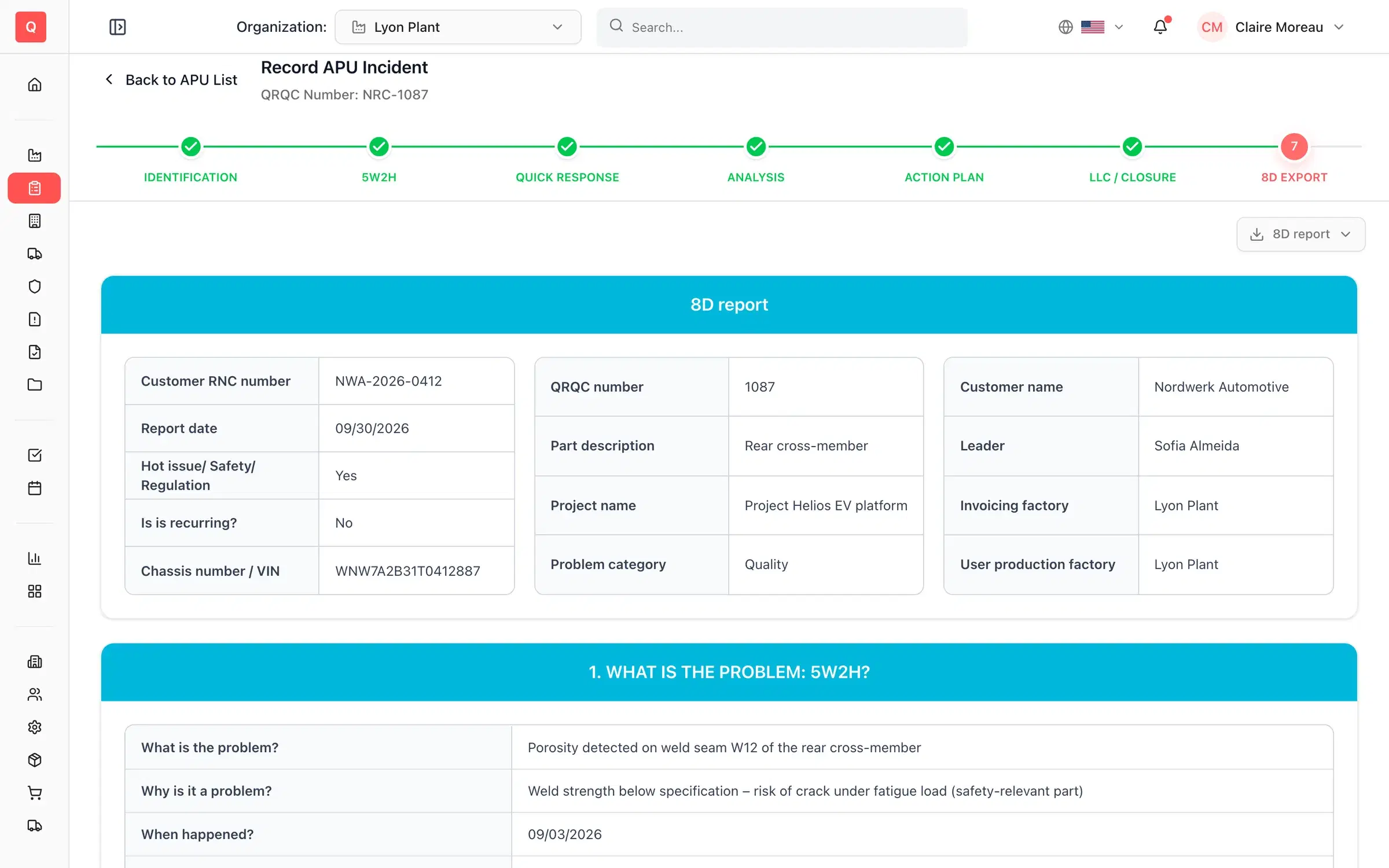
Close with a lessons-learned card, share it with the right people and generate the 8D report your customer expects — carrying your logo.
- Lessons learned, design rules and safety rules
- Before/after comparison shared by email
- 8D report exported to PDF or Excel in one click
Modules
Every level of QRQC, one escalation path
Start at the line. Escalate to the workshop or the plant when a problem needs more support — the full history follows the incident.
01
Line QRQC
5-step QRQC at the workstation, run by the team leader.
02
APU QRQC
7-step problem solving for the autonomous production unit.
03
Plant QRQC
Plant-level QRQC for customer claims and major issues.
Supplier QRQC
Notify non-conformities, let suppliers contain and analyze in their portal, and track charge-backs.
Warranty QRQC
Handle zero-km and warranty claims with the same method and their own KPIs.
Project QRQC
Apply QRQC to launch and development issues, before start of production.
HSE QRQC
Health, safety and environment events: injured persons, witnesses, A/B/C emergency escalation and safety alerts.
Waivers
Request, approve and follow product derogations with validation roles, expiry dates and reminders.
Quick actions
Assign immediate actions by Safety, Quality, Cost, Delivery and People category and email the assignment sheet.
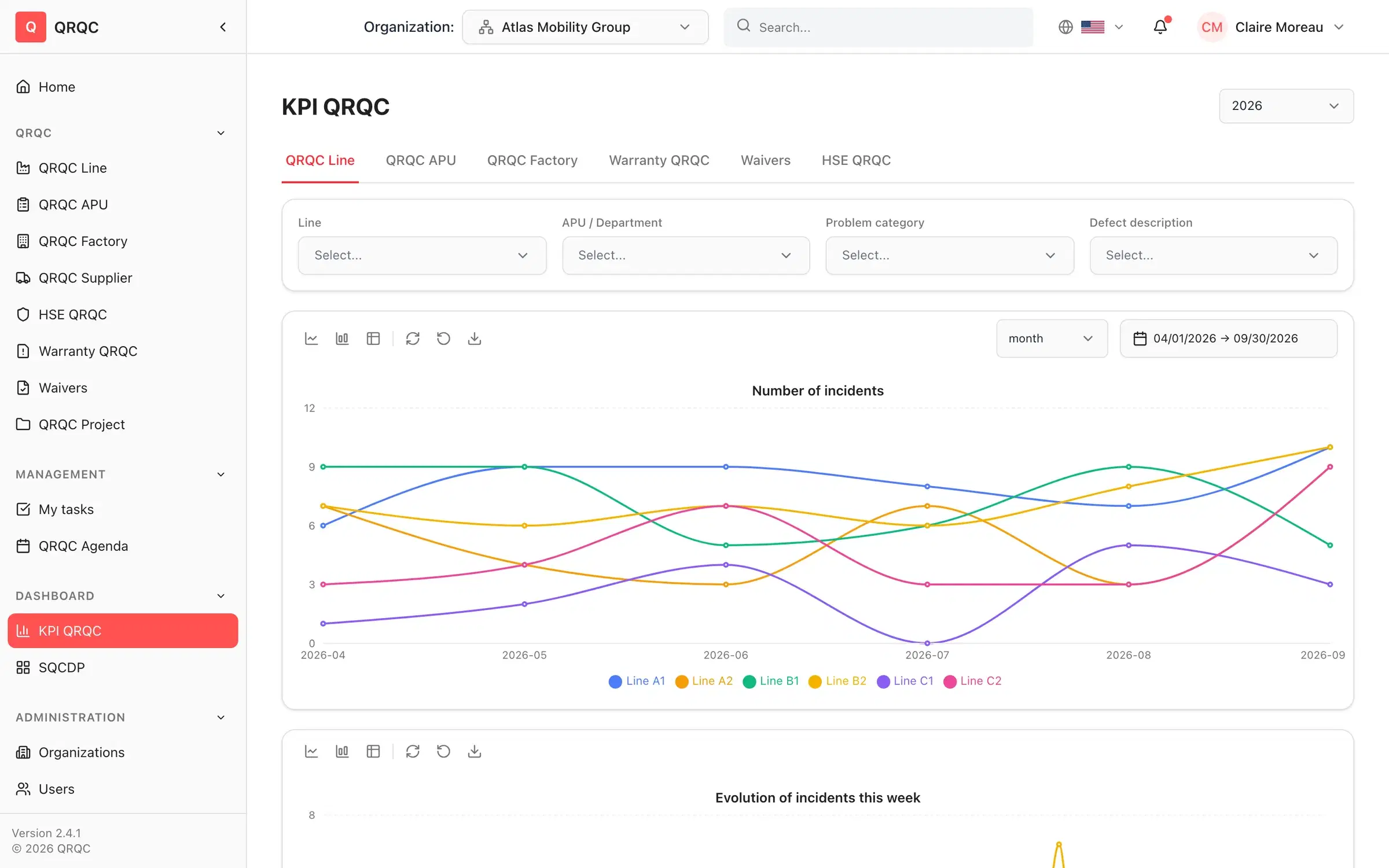
KPIs
Live KPIs for every line, workshop and plant
No more Monday-morning consolidation. Every chart is computed from the incidents themselves — for one plant or the whole group.
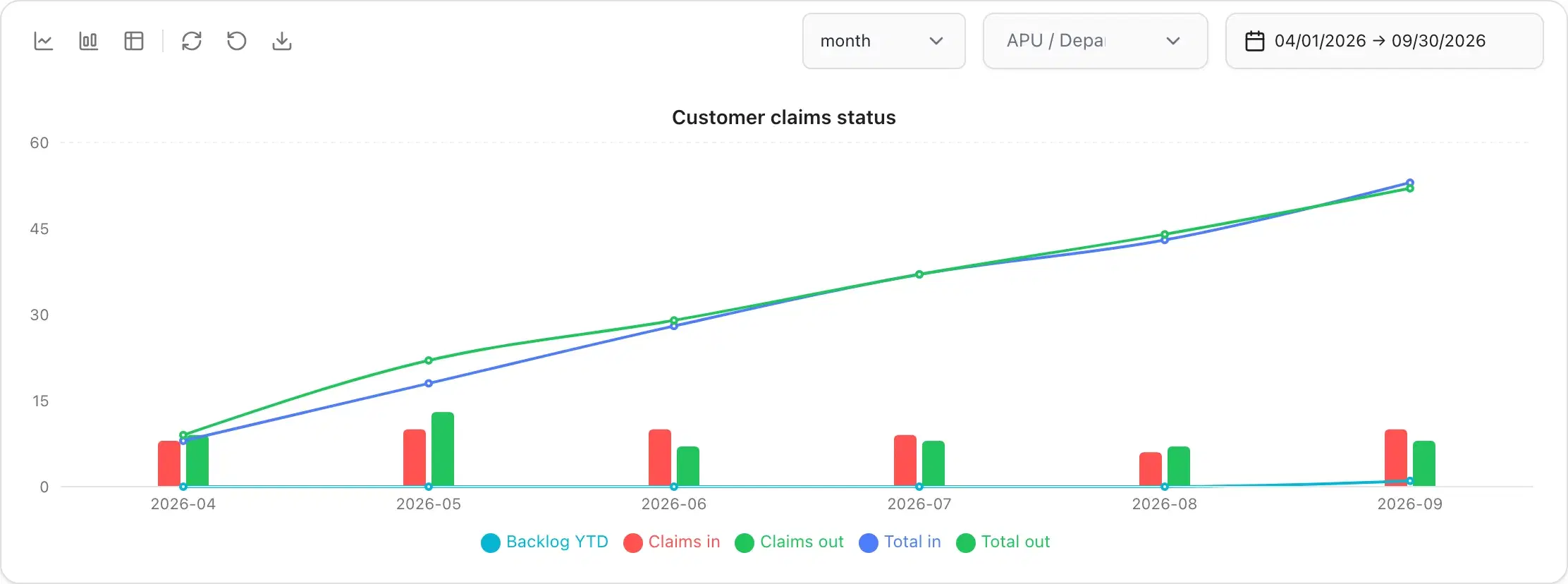
Trends and backlog
Incidents over time, IN/OUT backlog for the fiscal year, non-conformities over 6 weeks and 6 months.
Pareto analysis
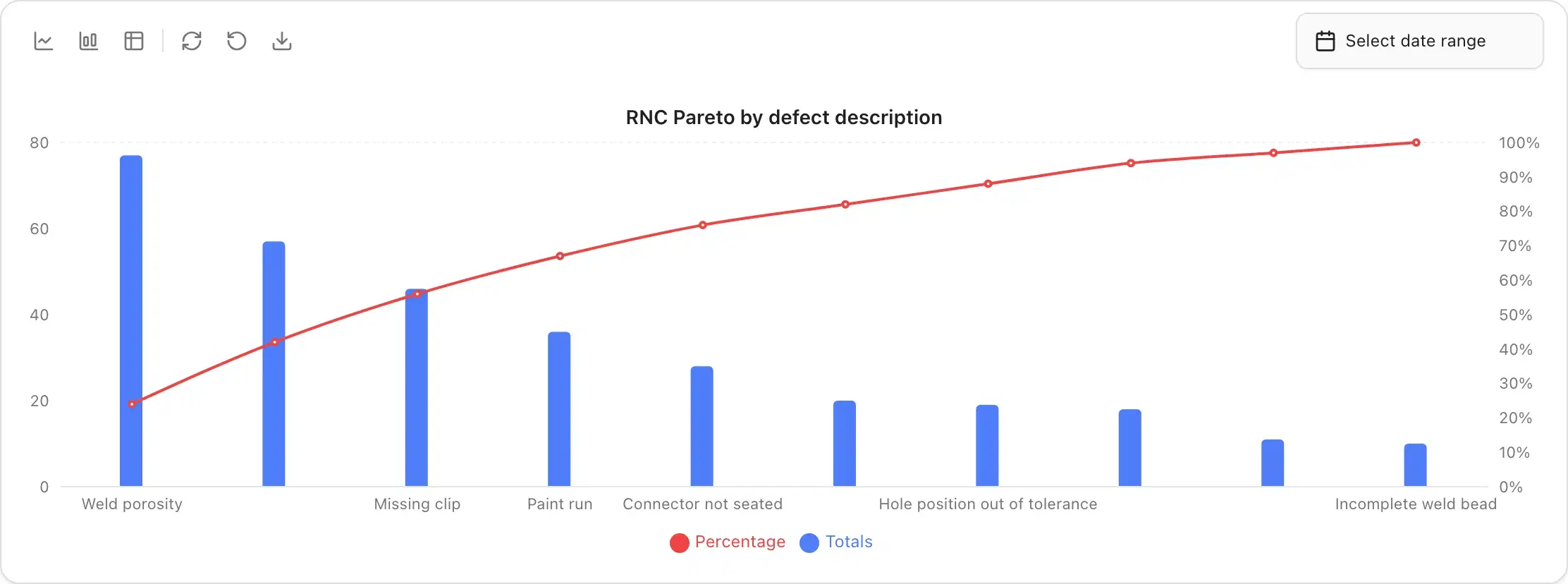
Pareto by failure type and defect description to focus effort where it pays off.
Deadline compliance
Share of incidents meeting the 24-hour, 10-day and 30-day targets, and actions not carried out.
Claims and warranty
Customer and warranty claim status, zero-km versus warranty, and delays per plant.
Every chart: switch line or bar, open the data table, export CSV or PNG. Filter by plant, workshop, line, category and period.
Daily QRQC meeting
Run your daily QRQC meeting from one screen
The agenda lists what is due within 24 hours, 10 days and 30 days. The SQCDP board shows safety, quality, cost, delivery and people at a glance. The built-in timer keeps the meeting short.
- Agenda of incidents by 24h, 10-day and 30-day deadline
- Daily report: what we improved yesterday, safety issues, Genba visit
- A meeting timer that stays on screen
- My tasks: every action assigned to me, across modules, exportable to Excel
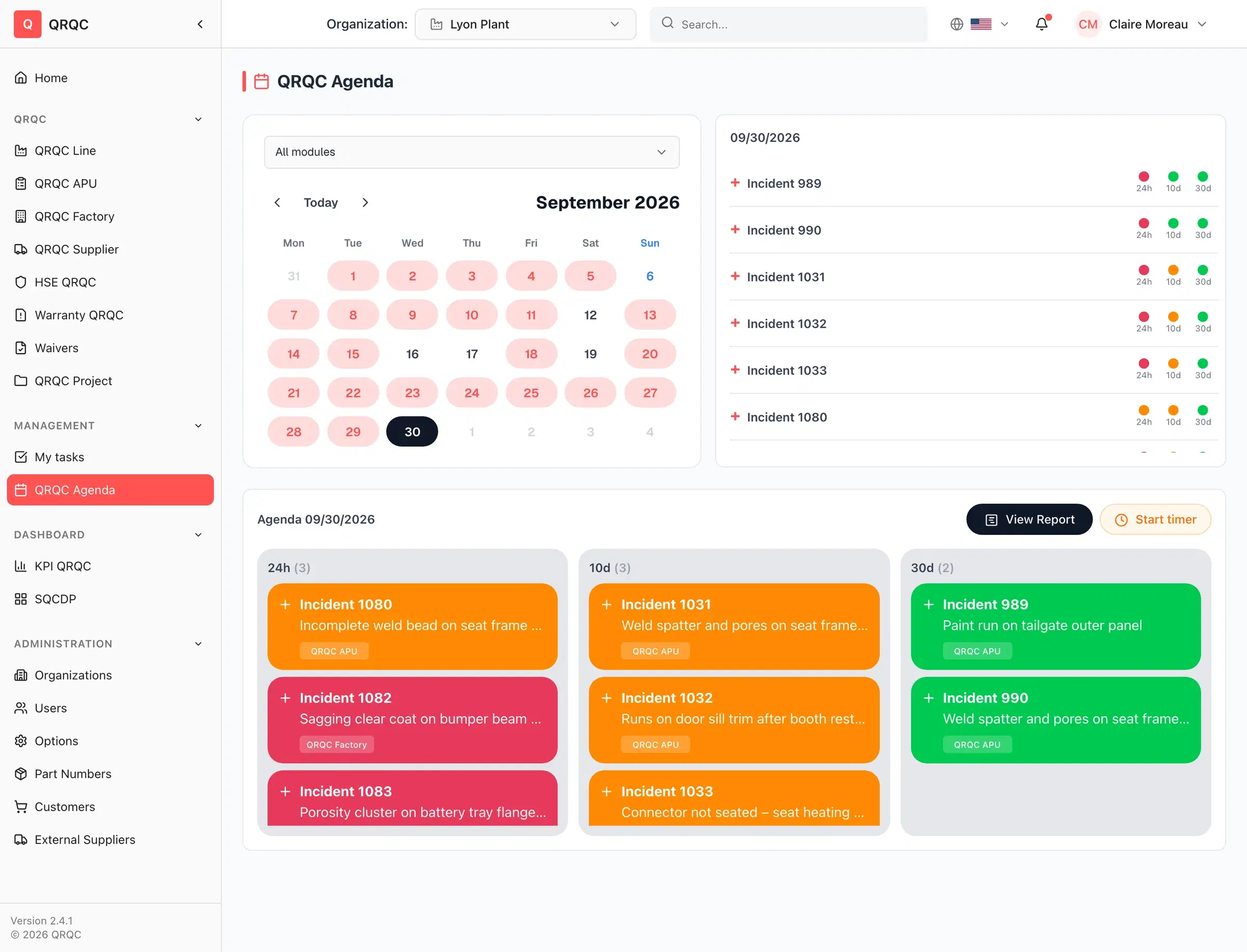
SQCDP board
One calendar per Safety, Quality, Cost, Delivery and People category turns red on incident days, with monthly metrics and assignments.
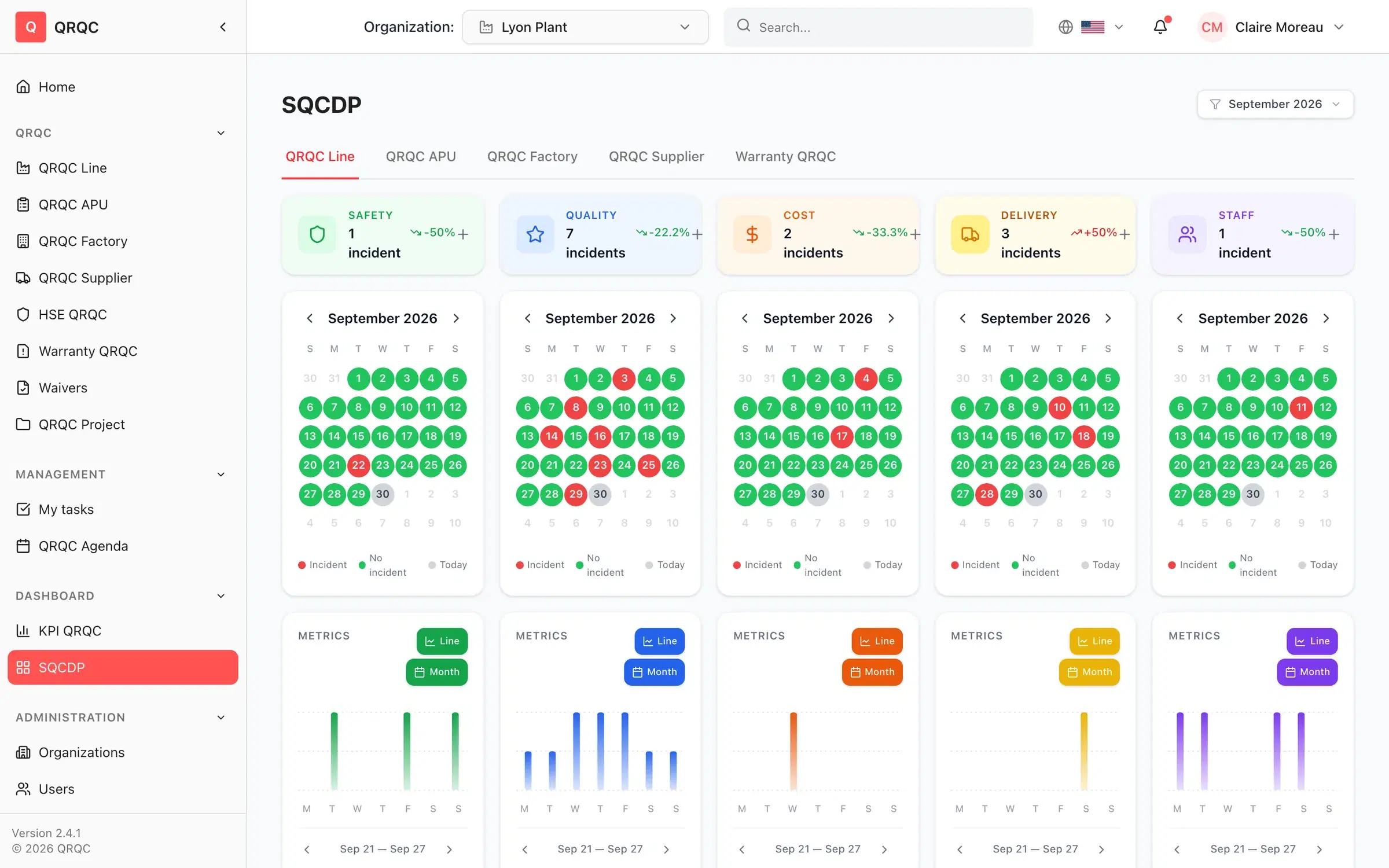
Supplier quality
Bring suppliers into the loop — without managing their passwords
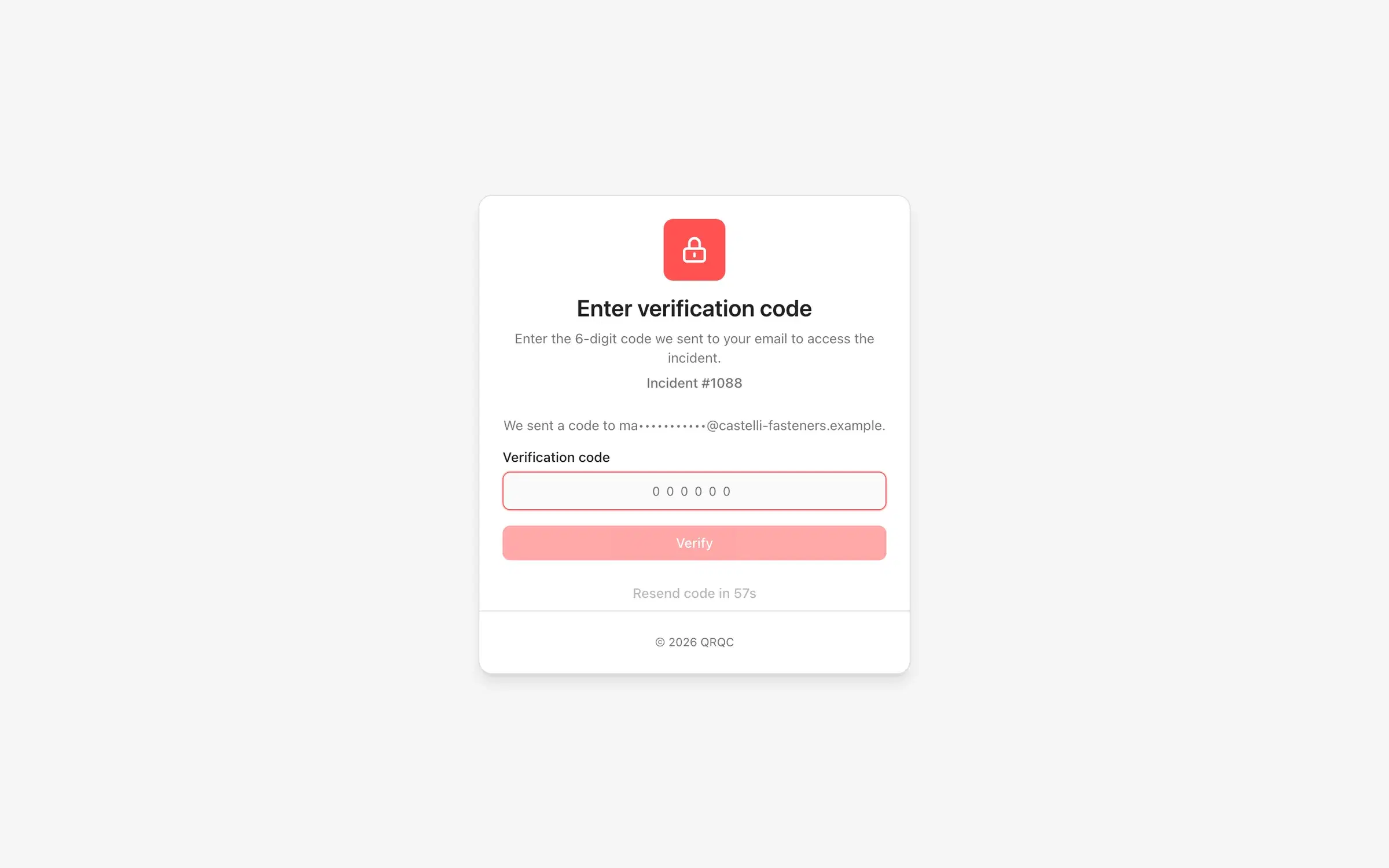
Send the non-conformity notification from the incident. Your supplier opens a secure link, confirms a one-time code by email and works only on the incidents assigned to them.
- 1
Notify
Send the RNC notification to the supplier contact straight from the 5W2H step.
- 2
Secure access
Passwordless sign-in with a 6-digit code sent by email — single-use, and locked after repeated failures.
- 3
Contain & analyze
The supplier fills in their own sorting, containment and root-cause analysis. Your validation steps stay read-only for them.
- 4
Close & charge back
Track retouch and administrative costs charged back to the supplier, then export the 8D.
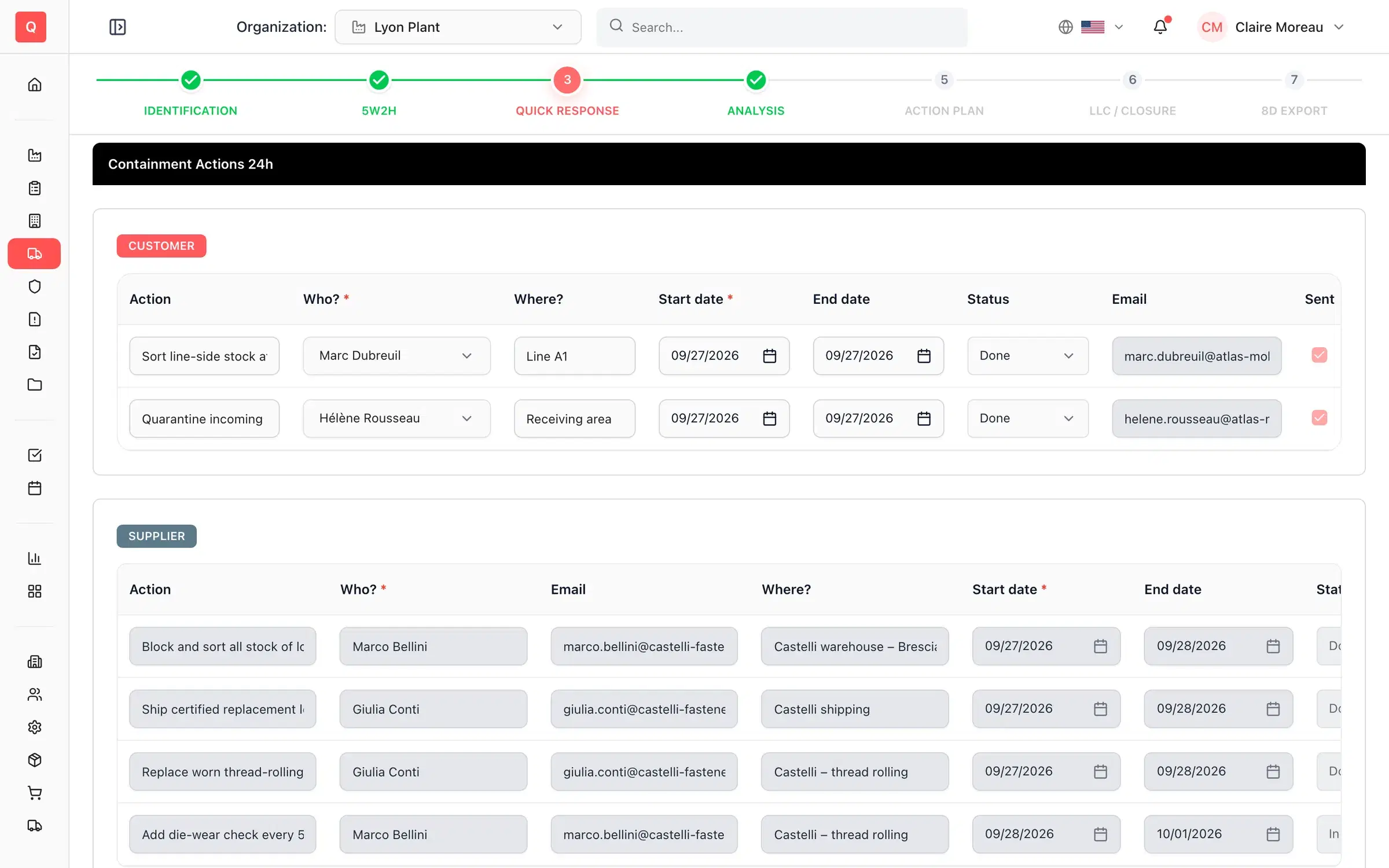
Built for groups
From one plant to a multi-site group
Structure your organization once, then give every person exactly the access they need — in their own language.
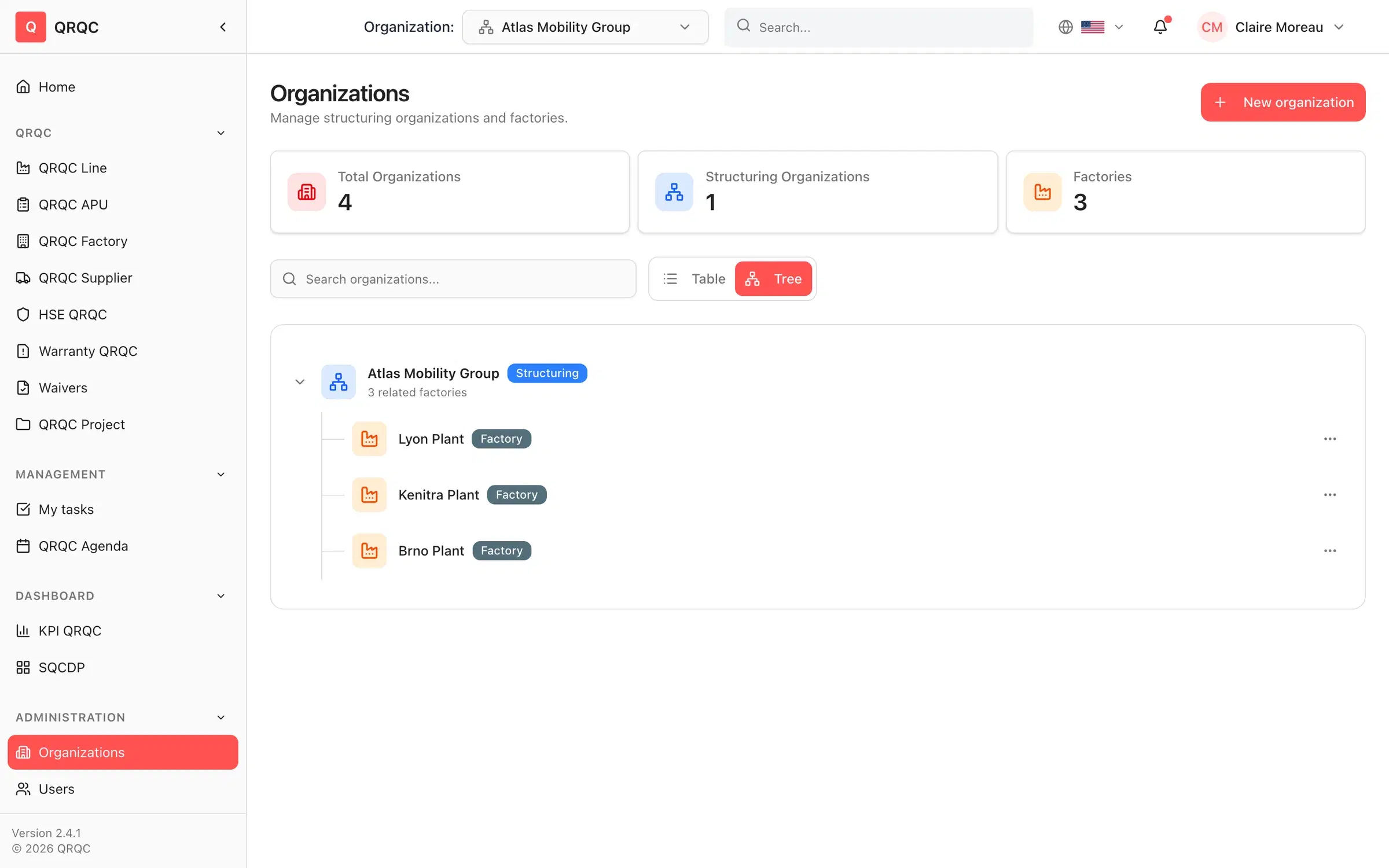
Multi-site structure
Organize plants under a group, switch organization in one click and consolidate KPIs across sites.
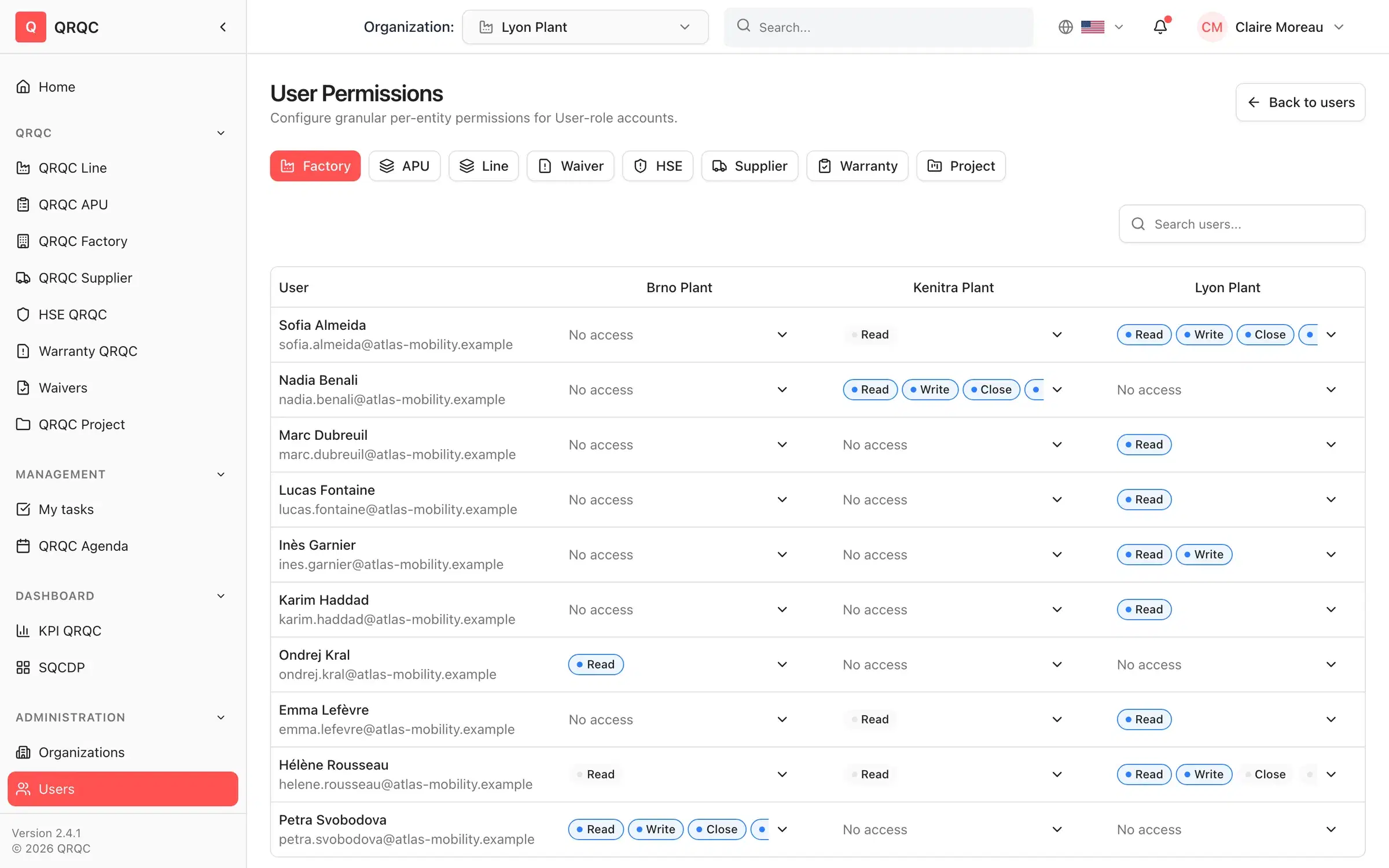
Permission matrix
Grant read, write, close, reopen, escalate and validate rights per plant, workshop and line, module by module.
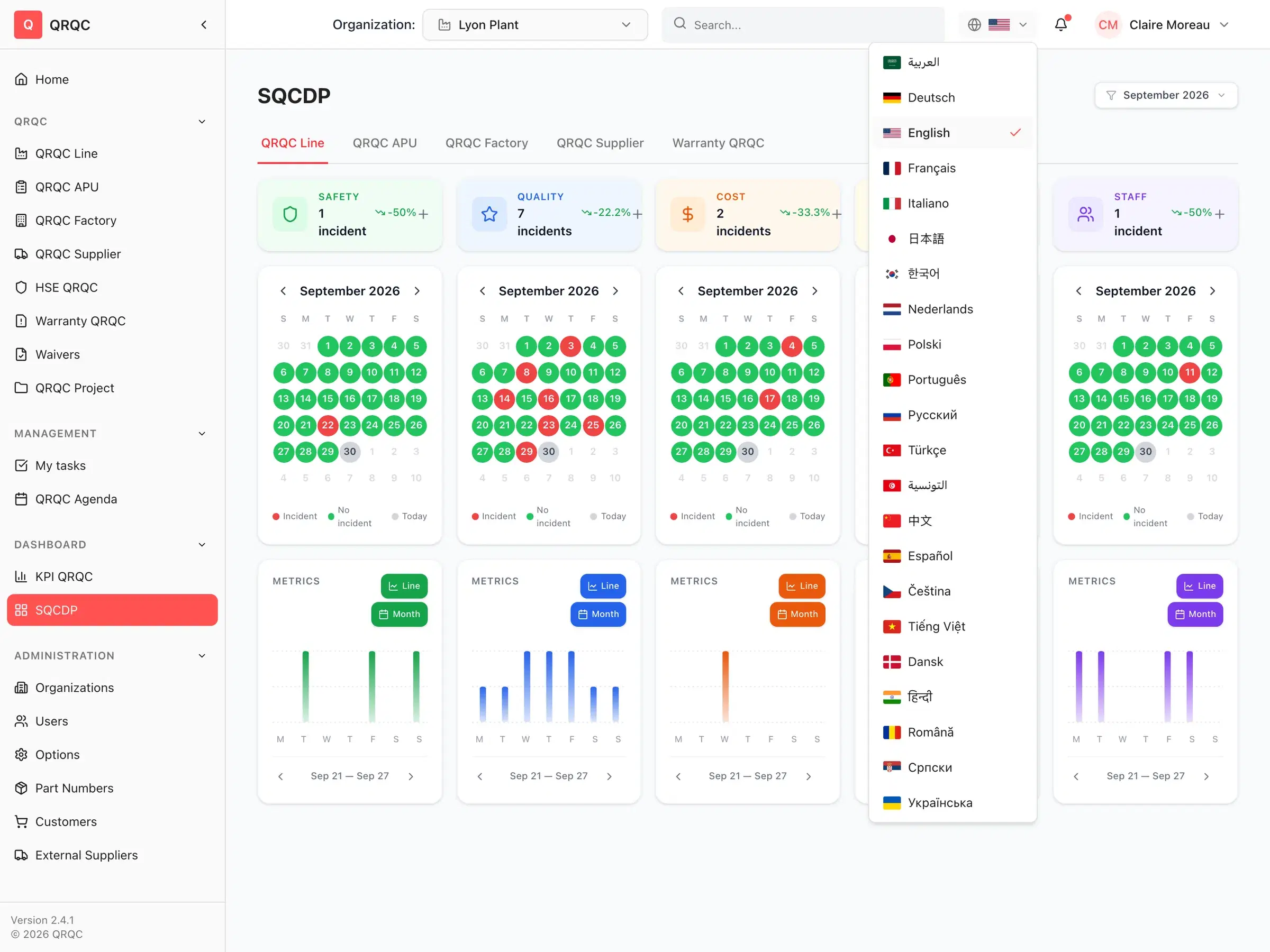
22 languages
Every operator works in their own language — from French and German to Arabic, Chinese, Hindi and Vietnamese, with right-to-left support.
Single sign-on
Microsoft, Google or any OIDC provider, with email-domain routing and optional enforcement.
Webhooks & imports
Push created, closed, escalated and deleted events to your systems. Import part numbers, customers, suppliers and users from CSV.
Your logo on every report
8D, lessons-learned, alert and list exports to PDF and Excel carry your organization's logo.
Security
Your quality data, protected by design
Quality records are sensitive. We host them in France, encrypt them and restrict access to the people who need them.
Hosted in France
Production runs on AWS in the Paris region (eu-west-3).
Encrypted
TLS in transit and encrypted storage at rest.
Single sign-on
Microsoft, Google and OIDC SSO, enforceable per email domain.
Least privilege
Roles plus a per-plant, per-module permission matrix. Suppliers only see their own incidents.
Passwordless for suppliers
Single-use email codes with attempt lockout — no shared passwords.
GDPR
A Data Processing Agreement comes with every contract.
FAQ
Questions & answers
Everything you need to know before booking a demo.
What is QRQC?
QRQC (Quick Response Quality Control) is a problem-solving method born in the automotive industry. Teams react to each defect immediately — at the real place, with the real parts — contain it within 24 hours, find the root cause and capitalize on what they learn. QRQC the software digitizes that routine from the line to the plant.
Which QRQC levels and modules are included?
Line, APU (workshop) and plant QRQC with one-click escalation, plus Supplier, Warranty, Project and HSE QRQC, waivers, quick actions, the QRQC agenda, the SQCDP board and KPI dashboards.
Can we generate 8D reports?
Yes. Every incident that goes through the 7-step flow produces an 8D report — problem, team, containment, investigation, root cause, action plan, efficiency and lessons learned — that you export to PDF or Excel with your logo.
How do suppliers take part?
From the incident, you send the RNC notification to your supplier contact. They receive a secure link, confirm a one-time code sent by email and can then fill in their sorting, containment and root-cause analysis for the incidents assigned to them — nothing else.
Can operators use it on the shop floor?
Yes. QRQC runs in the browser on phones, tablets and shop-floor PCs, with nothing to install. Operators record an incident with the guided 5W2H form and photos, in their own language.
Which languages are supported?
The application is available in 22 languages: English, French, German, Spanish, Italian, Portuguese, Dutch, Polish, Czech, Romanian, Serbian, Danish, Russian, Ukrainian, Turkish, Arabic, Tunisian Arabic, Hindi, Chinese, Japanese, Korean and Vietnamese.
Can QRQC connect to our ERP or other tools?
QRQC sends webhooks when incidents are created, closed, escalated or deleted in any module, and every list and report exports to Excel or PDF. Part numbers, customers, suppliers and users can be imported from CSV.
Where is our data hosted?
In France, on AWS in the Paris region, encrypted in transit and at rest. A GDPR Data Processing Agreement is included with every contract.
How do users sign in?
With email and password, or with single sign-on through Microsoft, Google or any OIDC provider. Administrators can enforce SSO per email domain and invite users in bulk from a CSV file.
Still have questions? Talk to our team →
30-minute demo
See your next incident solved in QRQC
We'll walk through a real incident from 5W2H to 8D and show how QRQC fits your lines, plants and suppliers.
30 minutes · No commitment · In English or French